Counselor Dashboard Overview
This article provides an overview of the Counselor Dashboard and how to filter student data for a customized view.
Last updated About 5 hours ago
Counselor Dashboard Overview
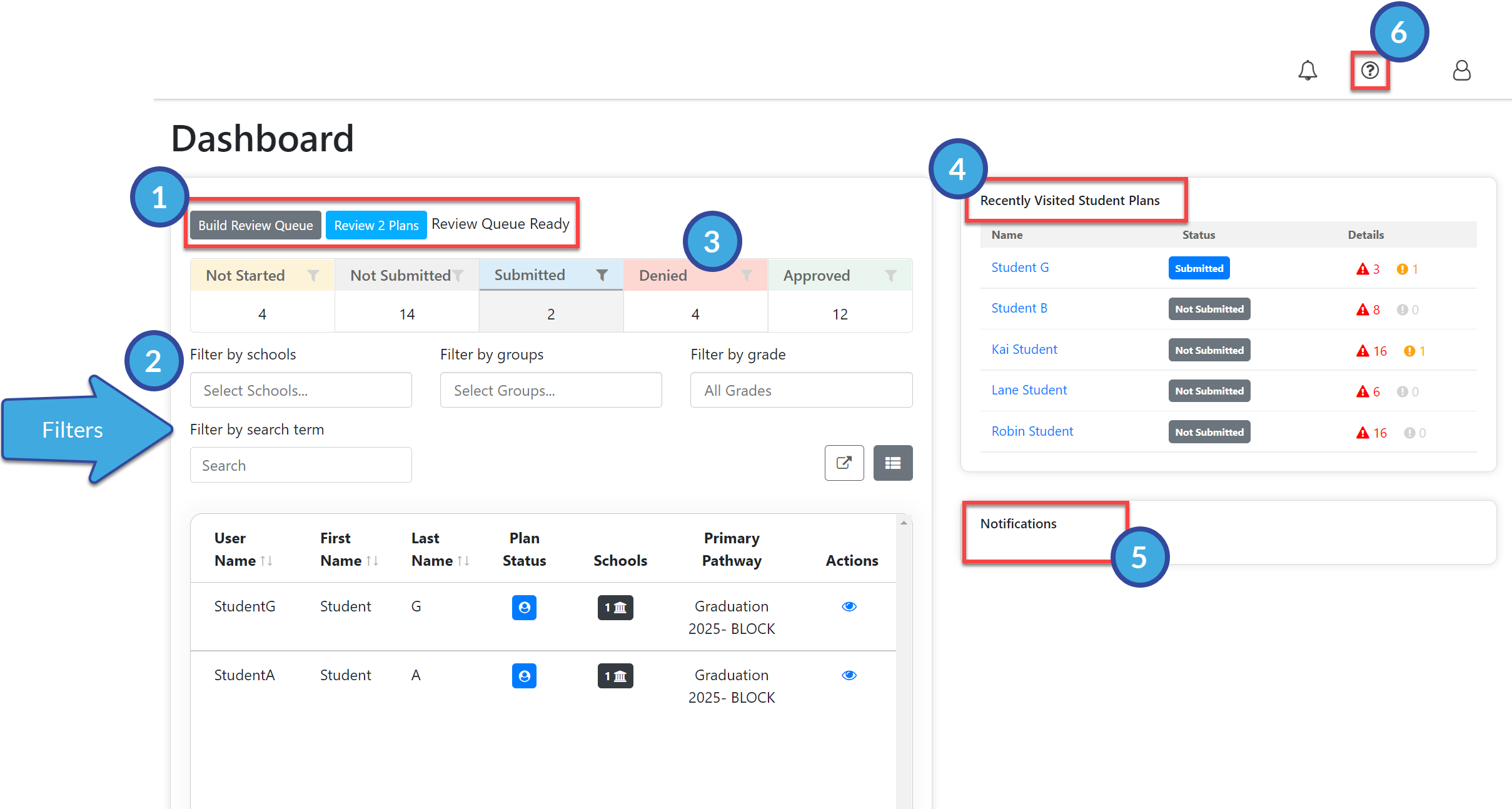
The Counselor Dashboard is an overview of data within Pathful Planner specific to the school or schools to which you have access. Student data is easy to access and customize using the features below.
Review Queue
The Review Queue allows you to quickly review the student Plans that have been submitted to you for approval.
See Review Queue for additional information.
Filters
Schools
Groups
Grade
Search term
Once you have filtered the data as desired, you can see the number of students within that data set who fit any of the following criteria by selecting one of the filter icons of your choice:
Not Started their Plan
Not Submitted their Plan
Needs Approval for their Plan
Have a Denied Plan
Have an Approved Plan
Recently Visited Student Plans
This is a fluid list of student Plans you have recently viewed.
Select the student's name to go directly to that student's Plan.
Notifications Section
Provides a list and a brief preview of your most recent notifications.
Select any notification for a complete view.
You can also access notifications from the bell icon in the upper right.
Help Center
The "?" icon in the upper right links to the knowledge base articles.