Identify Your Pathful Plan
This article helps you identify the level of Pathful product you have and the features that go along with your plan.
Last updated About 2 months ago
Identify Your Pathful Plan
Pathful offers three different implementation plans:
Complete Pathful system
College and Career Exploration (CCE, formerly Explore)
Work-based Learning (WBL, formerly Connect)
To check which Pathful version your school or district has purchased, look at your top menu once you’ve logged in. Below, are images and explanations to help you identify your access based on the menu modules you see. The student menus will also reflect the same access.
Your options for the full Pathful systeminclude Postsecondary and Work-based Learning.

If your district has opted for the CCE version (College and Career Exploration), your menu will NOT include the Work-based Learning option. The other modules have the same features as the full Pathful system.

If your district has opted for the WBL version (Work-based learning), your menu will NOT include the Postsecondary option. The other modules have the same features as the full Pathful system.

Look below to see what is included in each of the modules on the Pathful platform.
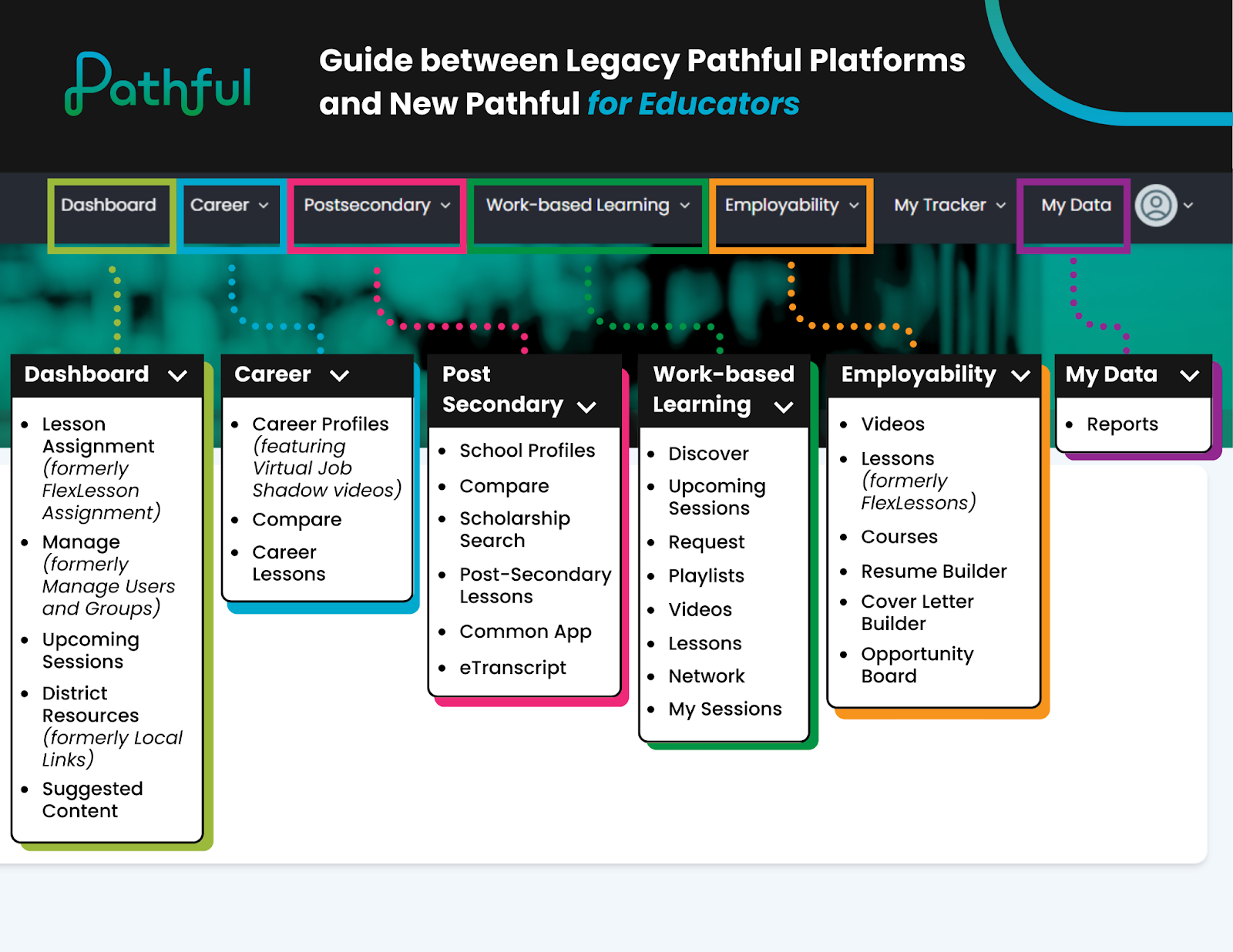
If you do not currently have the full Pathful system and would like to expand your program, contact sales@pathful.com and they can connect you with your customer service manager.
Was this helpful?
Still need help? Ask the team